Page 2 of 2

Re: Problems with scheduling automatic recordings

Posted: 18 May 2016 16:34
by radio42
A new v4.0.1.27 - update is out.
It includes the ability to combine control-commands for overlays being combined in parallel.

Re: Problems with scheduling automatic recordings

Posted: 21 May 2016 14:46
by Havenstad FM
Hi Bernd,

After updating to 4.0.1.27 i still have a problem to start the recording. And the order is still changing too. Please explain to me what i am doing wrong...

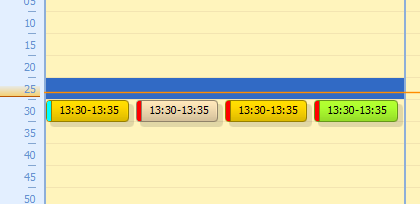
In the next screenshot you can see how i defined 4 overlays in the overlay scheduler:
Overlay_setup.PNG
Overlay_setup.PNG (5.27 KiB) Viewed 9212 times
The first one is of type EndsAt 13:30, the other three are Fixed at 13:30. Priorities from left to right: 0, 1, 2, 3, names are VN, TEST NEWS, NN and TEST OPNAME.
All overlays have Max Start Delay, Show in Advance and Approx. Duration set to 300 seconds.
The yellow overlays play a commercial block if available, the light beige overlay plays the news and the green overlay plays a script consisting of the HFM_TOH_NONSTOP jingle. Only the green overlay has a command set to start recording On Overlay Played.

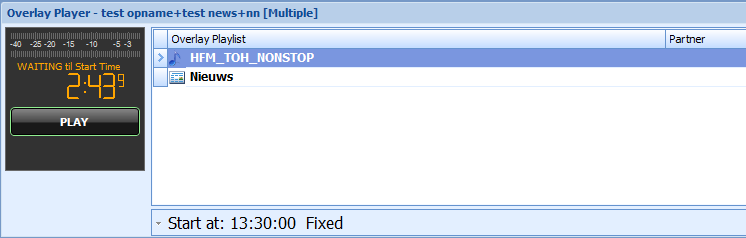
In this case there are no commercials planned for 13:30. Below you see the playout sequence of the overlay player:
Playout.PNG
Playout.PNG (9.37 KiB) Viewed 9212 times
As you can see there are no commercials, only the news and the jingle, but the jingle is played first although it has the prio 3 and the news has prio 1 In this case the recording is started.

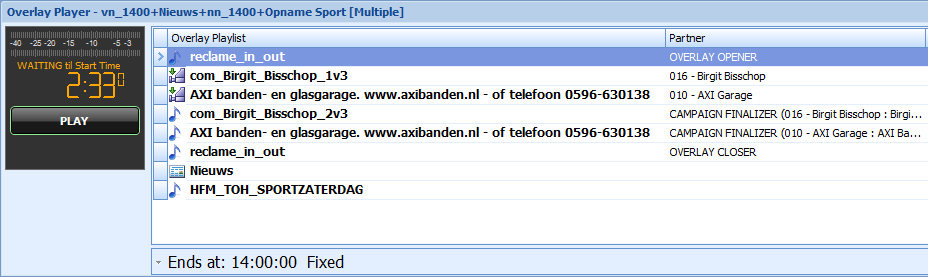
In the next case only the first overlay contains commercials and then the playout will be like this:
Playout2.PNG
Playout2.PNG (23.58 KiB) Viewed 9212 times
Now you can see that the priority order is correct. First the vn_1400 overlay plays 4 commercials then the Nieuws overlay is played and because the nn_1400 overlay contains no commercials finally the Opname Sport overlay is played which contains only the jingle and the recording command. But in this case the recording is NOT started.

With kind regards,

Jack Reitsema
ITC Havenstad.FM

Re: Problems with scheduling automatic recordings

Posted: 21 May 2016 15:01
by radio42
Please send me your full overlay calendar file to take a look at.
Only from the above screenshots it's missing stuff...

Re: Problems with scheduling automatic recordings

Posted: 21 May 2016 15:13
by Havenstad FM
Hi Bernd,

Here it is:

Re: Problems with scheduling automatic recordings

Posted: 21 May 2016 20:45
by radio42
Upps, you send me the program scheduler calendar - but I need the Overlay.calendar - which is contained in your Advert Storage Path !

Re: Problems with scheduling automatic recordings

Posted: 21 May 2016 22:04
by Havenstad FM
Sorry Bernd,

Then this is the one:

Re: Problems with scheduling automatic recordings

Posted: 23 May 2016 20:08
by radio42
Thanks for your file - now I can see what is going wrong.

A new v4.0.1.30-beta is already available, which should fix the issue.
So please "Check for Beta-Versions..."

Re: Problems with scheduling automatic recordings

Posted: 28 May 2016 18:15
by Havenstad FM
Hi Bernd,

I have been testing with version v4.0.1.32 today and most of the issues have been resolved. You managed to retain the priority of the overlays even if the commercial overlays have no content and the commands are now executed regardless in which overlay they are defined.

In my case i like to start the the recording exactly at the start of the last overlay. With the current setup that does not seem to be possible. I solved this by removing the recording commands from the overlays and put them in the opening track for the hour, which is played by the last overlay. By putting the stop-recording command in the overlay-start-playing event it functions exactly as we want it. The hour is recorded right from the opener to the end of the show without the commercials and the news bulletin. And it does not matter if it is a scheduled or a manual playlist.

Big thanks for your help in resolving this issue.

With kind regards,

Jack Reitsema
ITC Havenstad.FM