Page 1 of 1
date vs date date vs date year
Posted: 25 Jun 2015 21:03
by hdradio
What is the difference (in scripts) between
date, date date and date year ?
I 've noticed that although I have selected "Least recently played" in a script line, it ignores a lot of songs. I am now reconstructing my scripts and I am trying to find what I did wrong.
Re: date vs date date vs date year
Posted: 25 Jun 2015 22:25
by radio42
Can you please clarify what you mean?
There is no notion of a "date", "date date" and "date year" within a script - or I do not know what you mean...
However, the "LeastRecentlyPlayed" script-line mode sorts your related media lib (resp. the filtered list of tracks in case you are using one) by the "Last Played" date and time value. And from that sorted list the 'first' track (as such the oldest) is picked. If that picked track is contained in the history, the next one is picked from that list...
The "LeastTimesPlayed" script-line mode does almost the same, except it sorts the list by "Play Counter".
Both do use the global EntryStatistic to determine the "Play Counter" resp. the "Last Played" date and time (in case of a remote media lib, this is kept on the central Media Library Server).
If you are in doubt for a particular track, you might search for it and press ALT+2 to see it's "Last Played" date and time.
So if you are using a script-line filter; may be that filter excludes certain tracks?!
Re: date vs date date vs date year
Posted: 26 Jun 2015 09:08
by hdradio
Sorry. My mistake.
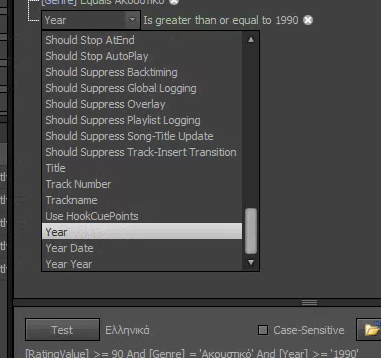
I meant year, year date, year year :
- date.png (57.91 KiB) Viewed 5913 times
What is the difference between them ?
Also using Alt+2 I see some of my songs that had last played on January and then not again although when I test the filter in script, they are shown.
Re: date vs date date vs date year
Posted: 26 Jun 2015 11:00
by hdradio
As a conclusion what to use if I need for example to choose songs with year > 2000 ?
If I use "Year" and the tag is "2015-01-10" or "2015-01" or "2015/01" what is the result of "Year > 2015" ?
Re: date vs date date vs date year
Posted: 26 Jun 2015 19:41
by radio42
Ahh,...
"Year": this is the native 'string' value from the media entries TAG data.
"Year Year": this is an 'integer' representation of the year portion of the 'Year' TAG data
"Year Date": this is a 'DateTime' representation of the 'Year' TAG data
So the 3 differ mainly by its data type.
Note:
- the "Year" criterion can always be evaluated, as it represents the native TAG data string
- the "Year Year" criterion might evaluate to 0 in case the 'Year' string can not be converted to an integer year portion (e.g. it is less than 4 chars long or the first 4 chars can not be converted into a year integer). This criterion expects the the 'Year' string in the format 'yyyy' or 'yyyy-MM...'
- the "Year Date" criterion might evaluate to DateTime.MinValue (which is 1.1.0000) in case the 'Year' string can not be converted to a regular DateTime value (e.g. the the 'Year' string is not in any of these formats: "yyyy", "yyyy-MM", "yyyy-MM-dd", "yyyy/MM/dd", "yyyy/MM", ISO 8601, RFC 1123, windows local format)
Re: date vs date date vs date year
Posted: 26 Jun 2015 21:58
by radio42
First you should note, that the script-line filter evaluates ALL the tracks within your selected lib! So all your TAG data must be considered.
The filter "Year > 2015" makes a case-insensitive string comparison (except you checked the Case-Sensitive option).
So all 'Year' TAG data entries having a string greater than "2015" are matching.
E.g. matching year tag entries are:
"2015-01", "2015-02", "2016" - but also "222-", "3", "A123", "n/a" ...
E.g. not matching year tag entries are:
"2015", "1999-01", "-", "02-2015" - but also all empty year tags ...
In essence: the quality of the final result heavily depends on the quality of your TAG data in all your files.
I.e. to make sure, that you really only get tracks greater the year 2000, make sure, that really ALL your tracks 'Year' TAG data is consistently tagged, e.g. using the format "yyyy-MM".