Page 1 of 1
mute speakers
Posted: 19 May 2016 13:04
by atlantico
Hi,
Is there any way to automatically mute speakers when “talk user” is switched on? It seems to me that this is not possible once you wrote somewhere that ProppFrexx doesn´t know what is connected, but anyhow let me ask.
Thanks a lot.
Luis
Re: mute speakers
Posted: 19 May 2016 15:15
by radio42
Yes, of course there is!
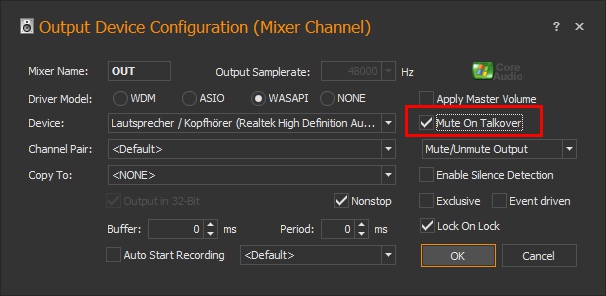
For Mixer Output Channels (which should be muted automatically) open the configuration dialog (double-click on the mixer name) and make sure the 'Mute on Talkover' option is selected:
- OutputMixerConfig.jpg (59.83 KiB) Viewed 3739 times
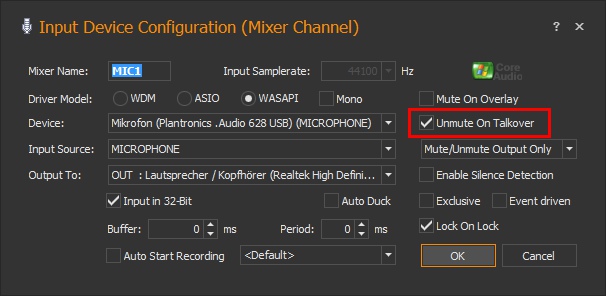
For Mixer Input Channels (which should be un-muted automatically) open the configuration dialog (double-click on the mixer name) and make sure the 'Unmute on Talkover' option is selected:
- InputMixerConfig.jpg (63.87 KiB) Viewed 3739 times
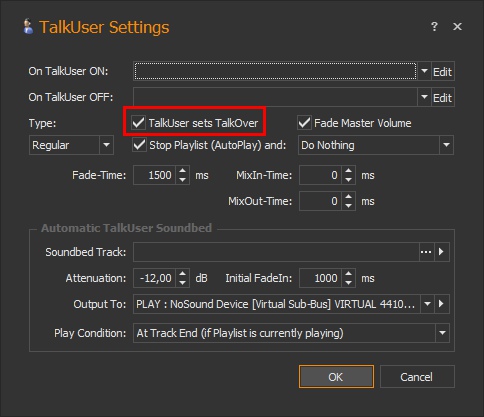
For the Talk-User functionality, also make sure, that you selected the 'TalkUser sets TalkOver' option (the TalkOver function is just about evaluating the above mentioned automatic muting/unmuting of mixer channels).
To invoke the Talk User Configuraiton, e.g. click on the small arrow underneath the TalkUser main ribbon tab icon:
- TalkUserConfig.jpg (62.85 KiB) Viewed 3739 times
Re: mute speakers
Posted: 19 May 2016 17:00
by atlantico
It seems that I was sleeping! Sorry!
Just the Mute On Talkover in the Output Device Configuration was not checked, by my mistake! Now is working.
Once more thank you for your attention, Bernd.
Luis