Studio setup (simple things)
Posted: 12 Dec 2021 16:02
Please could you help me with these 2 simple problems in my studio setup?
Studio:
- One computer where ProppFrexx OnAir is running (Windows 10 Pro)
- External sound card (Tascam US-16x08 - https://tascam.com/us/product/us-16x08/top)
- 3 studio Mics
- One output from external soundcard to studio monitors
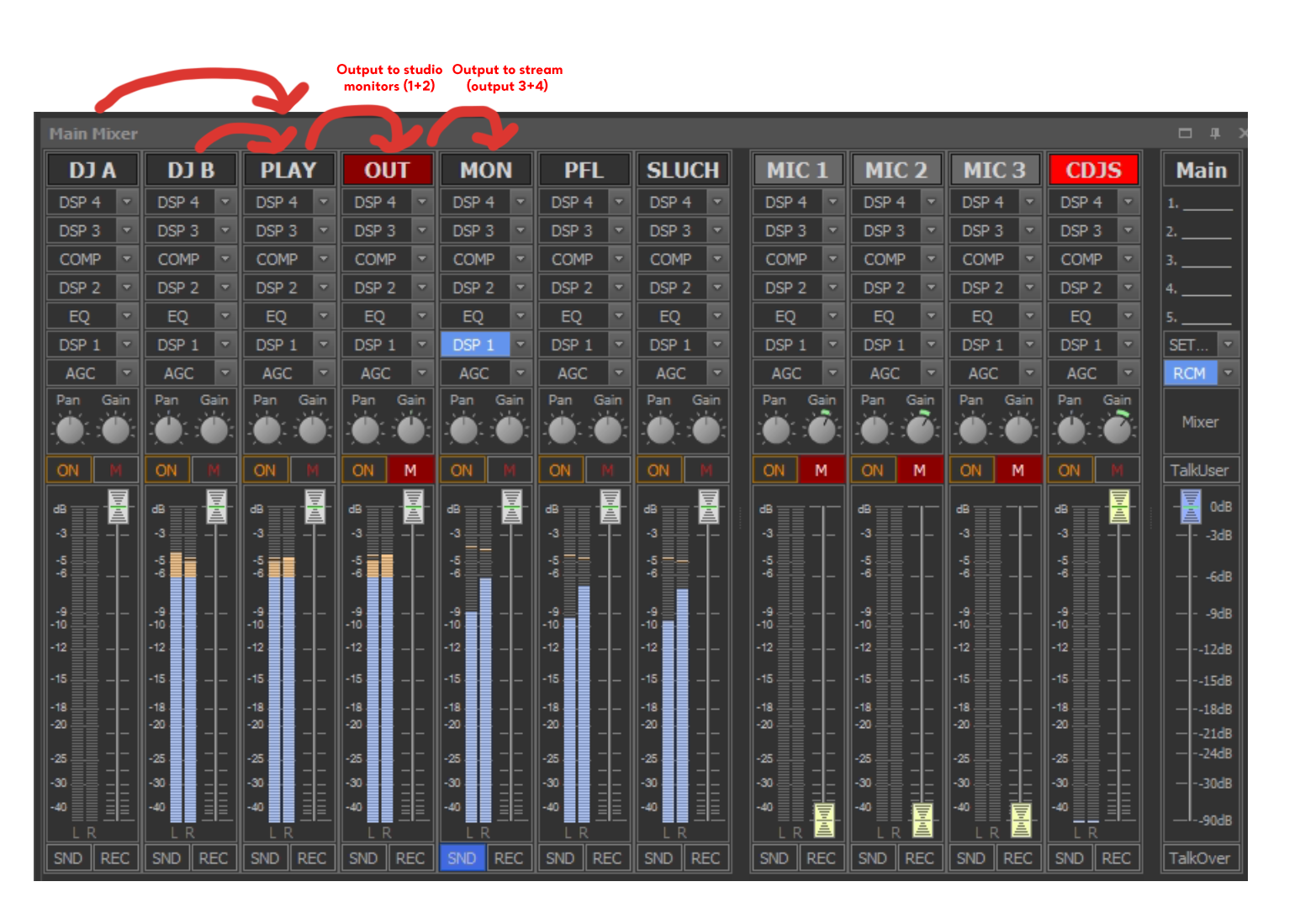
I am using quite standard mixer setup (based on ProppFrexx Userr manual, please see screenshot bellow). All mixer channels are using ASIO.
http://www.testarea.cz/mixer.png
Now, my 2 simple questions are:
1. How can I play through ProppFrexx any audio played on my computer (like Windows media player, Winamp, Spotify, etc.)? Does exists any way how to add it as new mixer channel to ProppFrexx? (The only way how I achieved it is, that I connect using wire output of internal soundcard to input of external soundcard Tascam US-16x08, then created input channel in Proppfrexx, this input channel linked to Output channel of Proppfrexx. But I beleive that this is very stupid solution J). Any other simple idea how to do this basic thing please? (Pleaso note, that once I use any other channel diffrent then ASIO, then I hear latency in MIC inputs).
2. Studio computer is often used as recording studio for pre-recorded podcasts. For example interviews with guests are often pre-recorded and then played using Program scheduler. BUT all mics are connected to ProppFrexx using ASIO and I am not able to use these mics in any other Windows appplication (like Audacity, or any other recording software). Even if I think about to buy new computer (only for recordings) then its no solution – because mics are already connected to external soundcard of Proppfrexx, and I cannot disconnect soundcard and connect it to new computer, otherwise my radio stream will stop working.
Sorry for this long question (post) but I think Iam solving problem, what all of you propably has already solved, but I cannot find solution.
Would you be so kind and tell me, how are you solving these simple problems?
Thank you!!
Studio:
- One computer where ProppFrexx OnAir is running (Windows 10 Pro)
- External sound card (Tascam US-16x08 - https://tascam.com/us/product/us-16x08/top)
- 3 studio Mics
- One output from external soundcard to studio monitors
I am using quite standard mixer setup (based on ProppFrexx Userr manual, please see screenshot bellow). All mixer channels are using ASIO.
http://www.testarea.cz/mixer.png
Now, my 2 simple questions are:
1. How can I play through ProppFrexx any audio played on my computer (like Windows media player, Winamp, Spotify, etc.)? Does exists any way how to add it as new mixer channel to ProppFrexx? (The only way how I achieved it is, that I connect using wire output of internal soundcard to input of external soundcard Tascam US-16x08, then created input channel in Proppfrexx, this input channel linked to Output channel of Proppfrexx. But I beleive that this is very stupid solution J). Any other simple idea how to do this basic thing please? (Pleaso note, that once I use any other channel diffrent then ASIO, then I hear latency in MIC inputs).
2. Studio computer is often used as recording studio for pre-recorded podcasts. For example interviews with guests are often pre-recorded and then played using Program scheduler. BUT all mics are connected to ProppFrexx using ASIO and I am not able to use these mics in any other Windows appplication (like Audacity, or any other recording software). Even if I think about to buy new computer (only for recordings) then its no solution – because mics are already connected to external soundcard of Proppfrexx, and I cannot disconnect soundcard and connect it to new computer, otherwise my radio stream will stop working.
Sorry for this long question (post) but I think Iam solving problem, what all of you propably has already solved, but I cannot find solution.
Would you be so kind and tell me, how are you solving these simple problems?
Thank you!!