Page 1 of 2
When using UAC : save of columns in playlist
Posted: 29 Sep 2013 14:07
by andrerotgans
Hi Bernd,
When not using UAC PFOA will remember which columns you've selected in your playlist view. However, when I'm using UAC (to disable some things for certain users), it will not do that anymore. It keeps coming back with the default view. Would it be possible to save the view within the user settings ?
Kind regards,
André
Re: When using UAC : save of columns in playlist
Posted: 29 Sep 2013 20:07
by radio42
Really?
I need to test that, as it was originally designed to save all layouts per user of course...if that doesn't work anymore..it seems to be a bug - I'll double check that!
Re: When using UAC : save of columns in playlist
Posted: 30 Sep 2013 10:13
by andrerotgans
Hi Berd,
Yes, really

If I have a look in the PFOA folder, I see for some layouts (streaming ie) different files for different users. However, that's not the case for the playlist.layout.
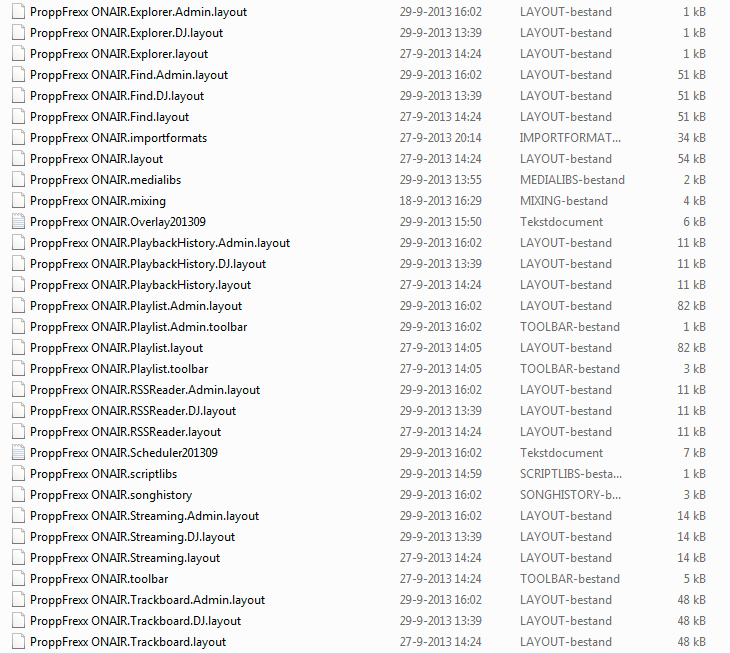
- VWS-Studio_1_-_Playlist_Layout.png (131.62 KiB) Viewed 14790 times
Re: When using UAC : save of columns in playlist
Posted: 30 Sep 2013 10:36
by andrerotgans
Yes, I saw the admin one, but not the DJ one. I'll first delete all of them and see what happens when I let PFOA recreate them...Because I can't see a reason for it not to work...
Re: When using UAC : save of columns in playlist
Posted: 30 Sep 2013 17:07
by radio42
In v3.0.12.6 the playlist window layout should now also be restored for already opened playlists.
Re: When using UAC : save of columns in playlist
Posted: 30 Sep 2013 20:32
by radio42
But it is there:
- "ProppFrexx ONAIR.Playlist.layout"
- "ProppFrexx ONAIR.Playlist.Admin.layout"
However, note, that the playlist layout is currently saved when user closes a playlist resp. restored when a user creates a new playlist.
As such, any already created playlists (which have effectively been created by another user) don't change its layout on the fly.
I'll take a look, if this might be changed.
Re: When using UAC : save of columns in playlist
Posted: 30 Sep 2013 21:16
by radio42
As said, currently already created playlist windows are left unchanged, but only newly created playlist windows are using a saved layout.
Also note that currently the playlist window layout is only saved when a user closes a playlist window.
So in your tests you should create and close a playlist window once the user has been changed.
And as said, I'll take a look to change this behavior, so that also old (already created) playlist windows are changed in their layout and that a currently opened playlist window will be used to save the playlist layout once you change/log-out a user.
Re: When using UAC : save of columns in playlist
Posted: 21 Jan 2014 18:51
by andrerotgans
Hi Bernd,
I still see some strange behavior when using a different columns layout for a different user than the Admin one.
- Logged in PFOA as the user I want to set the colums for
- Create a new playlist
- change colums (delete some, add some, change the order)
- Close playlist (tried both saving it first and just discarding it)
- Re-open that playlist : colums are the ones befóre saving
Can't seem to find what I do wrong, as when I'm logged in as Admin I do exactly the same and it works fine. It does what I want : when creating a new playlist or opening an older one, it uses the last used colums and column order. Which is set to the colums I want.
I'm using PFOA 3.0.12.10.
regards,
André
Re: When using UAC : save of columns in playlist
Posted: 21 Jan 2014 21:47
by radio42
What effective User Rights does your user account have?
Re: When using UAC : save of columns in playlist
Posted: 21 Jan 2014 22:03
by andrerotgans
Hi Bernd,
Please find included the (what I think) most important settings. I've included the user profiles in which I've added control to the advanced playlist settings.
Hopefully you see something I tend to overlook,
André