Page 1 of 1
News and Avertising, and RVT
Posted: 01 Feb 2017 16:38
by Bumperke
Hei Bernd, here i'm again.
We never know what the exact time from the news and advertising is.
I know there is a backtime option, but the dj's still need to guess the exact time.
E.g. news till 8:02:15, adds till 8:04:30. the script always picks one hour of music. You never knew in front if the last record will play.
Is there a possibility to let the script combine the advertscheduler? Or, is there already a solution?
Will
EDIT: I should be cool to work in the RVT inviroment an the clock shows 'real' time.
Re: News and Avertising, and RVT
Posted: 01 Feb 2017 17:23
by radio42
There are two displays which estimate there time.
One is directly underneath the DJ Players - it shows the effective time til the OVL (next overlay) is due.
The over is the TimeCode Window panel. It should also display the next upcoming OVL due time.
Have you tried these?
The above is of course only true in the real non-stop environment.
For RVT you actually have the option in the remote wizard to 'Resolve Overlays'.
In that case the playlist will directly contain a related embedded entry. So you know the exact position when the overlay is supposed to play.
When uploading Ader back to the nonstop system this embedded overlay entry will exactly play the Advert at this point.
Have you used this option in your RVT session?
Re: News and Avertising, and RVT
Posted: 01 Feb 2017 18:00
by Bumperke
I didn't know it was there? I will look for the resolve option and try it. Cool.
Re: News and Avertising, and RVT
Posted: 02 Feb 2017 07:39
by Bumperke
radio42 wrote:
For RVT you actually have the option in the remote wizard to 'Resolve Overlays'.
In that case the playlist will directly contain a related embedded entry. So you know the exact position when the overlay is supposed to play.
When uploading Ader back to the nonstop system this embedded overlay entry will exactly play the Advert at this point.
Have you used this option in your RVT session?
Can't find it in the manual. Do I have to look in the general settings? There, btw, is no chapter with tips etc concerning remote voice tracking? Unfortunately.
Will
Re: News and Avertising, and RVT
Posted: 02 Feb 2017 08:39
by radio42
You can find a training video about Remote Voice Tracking here:
viewtopic.php?f=5&t=1018
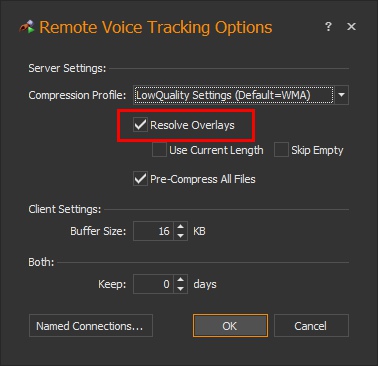
You need to set the option on the server side - see general settings, section Encoding/Recording and click on the 'More Remote Voice Tracking Options' - see image below:
- RVT Settings.jpg (38.94 KiB) Viewed 7738 times
In addition you might in any dialog press the '?' icon at the very top right to display a detailed help about any option...
Resolve Overlays:
If checked, overlay scheduler entries will be resolved to remote playlists during remote voice tracking.
This means, that the resulting playlist template will contain dynamic overlay reference entries. This will allow the remote DJ to recognize the exact location of the overlay playout and align his voice over accordingly. This however also means, that the overlay playout is triggered via the playlist itself and that the DJ might change or even delete those overlays.
Re: News and Avertising, and RVT
Posted: 02 Feb 2017 17:39
by Bumperke
radio42 wrote: This will allow the remote DJ to recognize the exact location of the overlay playout and align his voice over accordingly. This however also means, that the overlay playout is triggered via the playlist itself and that the DJ might change or even delete those overlays.
Ohh that is tricky, we have to be sure to use this option.
Re: News and Avertising, and RVT
Posted: 02 Feb 2017 18:03
by radio42
That's why it is placed to be configured on server-side - so a client cannot change it
