Page 1 of 2
Cue points forced?
Posted: 07 May 2024 19:31
by claudius06
Hello Bernd,
I'm broadcasting a show in 3 parts (3 mp3 files). Why does the 3rd and final file end in a fade even though I only set an In and Out? The host concludes with a speech, and because of this issue, his speech is drowned out by the TOTH.
How absolutely to avoid this?
Thank you for your help.
Claude.
Re: Cue points forced?
Posted: 07 May 2024 21:33
by radio42
By default there is no fade - and ProppFrexx doesn’t know anything about a 1st, 2nd or 3rd part.
So could it be, that your following program or TOTH fades out the last part as it starts fixed even before the last part ends? If yes, you should start the next program soft…
Re: Cue points forced?
Posted: 07 May 2024 23:07
by claudius06
The following programs or overlays are in SOFT, that's why I don't understand. Could there be a setting to check in the general settings?
Re: Cue points forced?
Posted: 08 May 2024 09:30
by radio42
The program resp. the overlay itself has the settings how ‚soft‘ the transition might be, eg. the MaxDelay, MaxLate settings. See the ‚?‘ or the tooltip for detailed help of these options.
Re: Cue points forced?
Posted: 09 May 2024 11:17
by claudius06
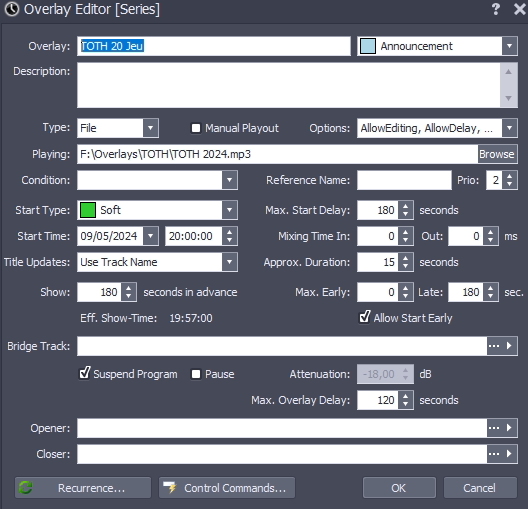
I reviewed the content of the "?" and according to the only section where mixing time is discussed, my settings are correct: 0 for Mixing Time In and 0 for Mixing Time Out as you can see in the image. In fact, I understand that with each overlay diffusion, PF systematically mixes the current track with the overlay. However, it is explained that "Set to 0 to start the overlay with the 'Next' cue-point of the current track of the current playlist."
On the third and final part of the show, I didn't set a 'Next', just an 'Out' without a fade because the show ends with a speech. Could that explain the issue?
Re: Cue points forced?
Posted: 09 May 2024 21:05
by radio42
When does/would the last track of your series end?
If it would for example end at around 20:03:10 or even later… it would violate the ‚Max. Late‘ condition and the last track would be faded out before its natural end.
I just also tried exactly your settings and let the last track finish just 70 sec. later than the overlays start time. And here the last track fully played til the end with no fading… and after the overlay started.
Re: Cue points forced?
Posted: 12 May 2024 16:55
by claudius06
I understand that, it seems logical to me, but it appears to me that even without exceeding the Max. Late, the problem existed. So, I will check at the next broadcast and activate the Debug Logging feature a little earlier to verify.
Re: Cue points forced?
Posted: 12 May 2024 21:57
by claudius06
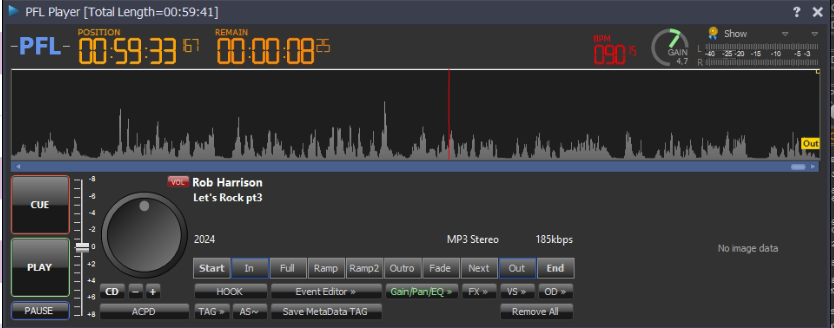
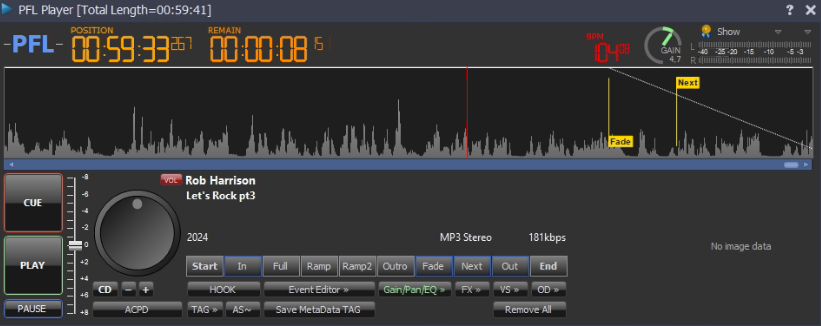
Actually, I saw live what's happening and it's a very strange behavior: when it's loaded and starts playing, PF adds a Next and a Fade at the end of the 3rd file, whereas originally there isn't one. Since I was able to remove it during the broadcast, the transition between the end of the show and the toth went ok.
Before launching
After
Re: Cue points forced?
Posted: 12 May 2024 22:09
by radio42
Make sure, that you have NOT set the 'RecalcACPD' script-line option!
You might also set the 'SuppressACPD' option instead to be sure, that the cue-points are not changed automatically.
Re: Cue points forced?
Posted: 13 May 2024 19:00
by claudius06
I checked, no RecalcACPD and regarding SuppressACPD, as it's a playlist, I don't have script options.
But about SuppressACPD, I have a question: I understood that it doesn't add cue points, but does it keep the ones I created?
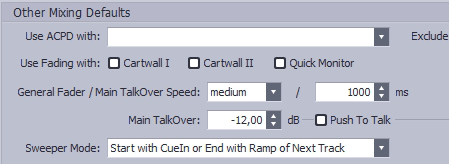
Also, I think the issue comes maybe from this setting "Use ACPD with" where the DJ Player and Standby Player boxes were checked. What do you think?