Remote presenter

Re: Remote presenter
Yes. This is exactly what the ‚Remote Voice Tracking‘ (RVT) is doing - see the Tutorial Video as well as the link in the first post. This does not need any virtual cable or device.
The way it works: A script or ready made playlist is first generated on the server (this even happens automatically when RVT starts). The remote DJ connects to the server and all tracks (even additionally compressed) are now transmitted from the server to the remote DJ. The remote DJ can now locally do his voice overs etc. When done, the complete playlist and all his recordings are transmitted back to the server. The original tracks from the server plus the voiceovers, all segues etc. are. Ow used and played on the server. Done.
The only thing the remote DJ can not access is the media libs and other tracks on the server, i.e. the tracks as given in the initial playlist have to be used.
The way it works: A script or ready made playlist is first generated on the server (this even happens automatically when RVT starts). The remote DJ connects to the server and all tracks (even additionally compressed) are now transmitted from the server to the remote DJ. The remote DJ can now locally do his voice overs etc. When done, the complete playlist and all his recordings are transmitted back to the server. The original tracks from the server plus the voiceovers, all segues etc. are. Ow used and played on the server. Done.
The only thing the remote DJ can not access is the media libs and other tracks on the server, i.e. the tracks as given in the initial playlist have to be used.
Bernd - radio42
ProppFrexx ONAIR - The Playout and Broadcast Automation Solution
ProppFrexx ONAIR - The Playout and Broadcast Automation Solution
-
claudius06
- Posts: 193
- Joined: 25 Nov 2023 09:23
Re: Remote presenter
Aside from the question of licensing for the remote DJ, after discussing with him, I don't think that's the setup I'm looking for. Our operation goes like this: the remote DJ prepares his playlist, sends me the list of tracks to prepare, and a few minutes before the live session, we both connect on Cleanfeed. He only launches the tracks live and I play them on PF. Finally, the remote DJ only has a microphone and a connection to Cleanfeed, and he should be able to hear the tracks and jingles but not his own voice.
So, I've imagined the following setup: I route my master output (OUT) to a virtual cable that I send to Cleanfeed, and I send the sound from Cleanfeed from the remote DJ to a line input on PF.
My question (maybe stupid, sorry): in this case, when I open the potentiometer of the remote DJ, is it possible to mute his own return like we do locally to avoid feedback (using "mute on talkover")?
So, I've imagined the following setup: I route my master output (OUT) to a virtual cable that I send to Cleanfeed, and I send the sound from Cleanfeed from the remote DJ to a line input on PF.
My question (maybe stupid, sorry): in this case, when I open the potentiometer of the remote DJ, is it possible to mute his own return like we do locally to avoid feedback (using "mute on talkover")?
Re: Remote presenter
If I understand you correctly, your ‚Remote DJ‘ comes in into an Input Mixer Channel.
If yes, you can treat this input channel like any other MIC channel. I.e. yes, you can mute any Mixer Output Channel when you activate that Input.
If yes, you can treat this input channel like any other MIC channel. I.e. yes, you can mute any Mixer Output Channel when you activate that Input.
Bernd - radio42
ProppFrexx ONAIR - The Playout and Broadcast Automation Solution
ProppFrexx ONAIR - The Playout and Broadcast Automation Solution
-
claudius06
- Posts: 193
- Joined: 25 Nov 2023 09:23
Re: Remote presenter
Hi Bernd,
It"s correct, my remote DJ‘ comes in into an Input Mixer Channel (via Cleanfeed).
But I think I found a simpler solution: I've created a second OUT channel that I send to the DJ remotely, and on this new OUT channel, I use SND on each IN channel that I want to send to the DJ via Cleanfeed, and obviously never his own voice.
I have two new questions related to the same subject:
1/ How can I do the same thing for Overlay and Cartwall sounds? Do I have to create IN channels for each of them?
2/ Regarding the PFL: to pre-listen to a track, I double-click on the track, but how do I do it on a line input?
3/ I have an OUT channel (my main output sent to streaming) with a DSP; is it possible to record this OUT channel without the DSP?
Thank you for your help.
It"s correct, my remote DJ‘ comes in into an Input Mixer Channel (via Cleanfeed).
But I think I found a simpler solution: I've created a second OUT channel that I send to the DJ remotely, and on this new OUT channel, I use SND on each IN channel that I want to send to the DJ via Cleanfeed, and obviously never his own voice.
I have two new questions related to the same subject:
1/ How can I do the same thing for Overlay and Cartwall sounds? Do I have to create IN channels for each of them?
2/ Regarding the PFL: to pre-listen to a track, I double-click on the track, but how do I do it on a line input?
3/ I have an OUT channel (my main output sent to streaming) with a DSP; is it possible to record this OUT channel without the DSP?
Thank you for your help.
Re: Remote presenter
1/ what same thing? Overlays and Cartwalls are played where? On the remote site or on the server. If on the server, these are output mixer channels and not input - so I don’t get your question. If on the remote site, you should send them on the same way/channel as the remote mic.
2/ you can SND a input mixer channel also an output.
3/ you said you had two questions no, recording always contains the DSP. But you can do the same trick as before create another output mixer channel - record this one and copy it to the real output on which you run the DSP.
2/ you can SND a input mixer channel also an output.
3/ you said you had two questions
no, recording always contains the DSP. But you can do the same trick as before create another output mixer channel - record this one and copy it to the real output on which you run the DSP.Bernd - radio42
ProppFrexx ONAIR - The Playout and Broadcast Automation Solution
ProppFrexx ONAIR - The Playout and Broadcast Automation Solution
-
claudius06
- Posts: 193
- Joined: 25 Nov 2023 09:23
Re: Remote presenter
Sorry, I think I made a mistake in my calculation!you said you had two questions
1. Currently, the cartwalls and overlays are being sent to PLAY (streaming). If I understood correctly, I need to create a Cartwall 1 channel, a Cartwall 2 channel, and an Overlay channel specifically for the cartwalls and overlay instead of sending them to PLAY as it's currently done.
2. Okay, but I can't understand how to listen to the sound before sending it ON AIR? What do I click on?
3. Okay, great! Thanks for the tip.
Re: Remote presenter
2/ you can output the input to your streaming output channel and use SND to your PFL output - just like you would do with an external console/mixer.
Bernd - radio42
ProppFrexx ONAIR - The Playout and Broadcast Automation Solution
ProppFrexx ONAIR - The Playout and Broadcast Automation Solution
-
claudius06
- Posts: 193
- Joined: 25 Nov 2023 09:23
Re: Remote presenter
Hello Bernd,
Point 2/I'm really sorry, but it's not working. I sent the streaming output channel (which I named "EXT") to the PFL channel via the SND, but... nothing.
And I'm going back to point 3/ I did as you said, but when I start a recording, I get a file of 1.87 KB and zero seconds. I can record all the other channels except the one I created specifically for this purpose.
Point 2/I'm really sorry, but it's not working. I sent the streaming output channel (which I named "EXT") to the PFL channel via the SND, but... nothing.
And I'm going back to point 3/ I did as you said, but when I start a recording, I get a file of 1.87 KB and zero seconds. I can record all the other channels except the one I created specifically for this purpose.
Re: Remote presenter
Hard to say from here, but when you ‚hear‘ something in the output it will also be recordable - so there must be something wrong with the recording settings… sounds like only the header is written, but no data. Is the channel on, not muted and fader up..?
Regarding the streaming output which can not be heard in the PFL - make sure it is not muted, fader is up etc. else the SND function is working fine here… so it must a level issue somewhere…
But this is hard to tell from here.
Regarding the streaming output which can not be heard in the PFL - make sure it is not muted, fader is up etc. else the SND function is working fine here… so it must a level issue somewhere…
But this is hard to tell from here.
Bernd - radio42
ProppFrexx ONAIR - The Playout and Broadcast Automation Solution
ProppFrexx ONAIR - The Playout and Broadcast Automation Solution
-
claudius06
- Posts: 193
- Joined: 25 Nov 2023 09:23
Re: Remote presenter
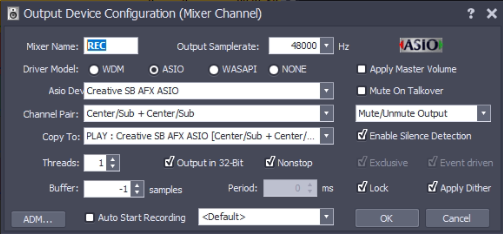
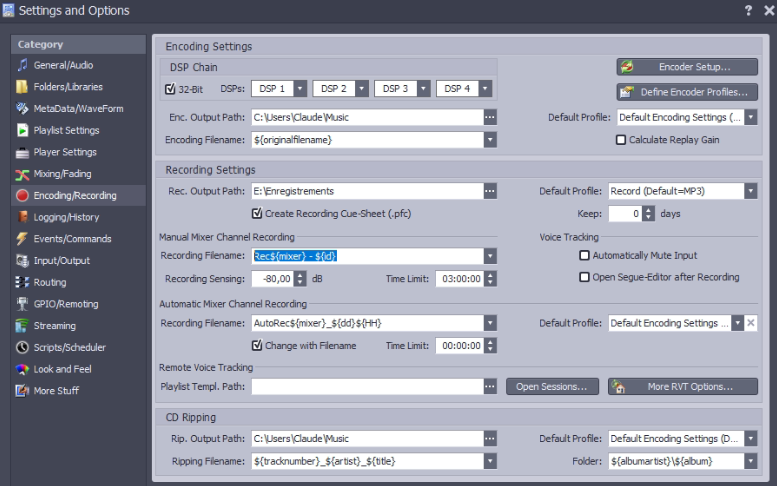
About my recording issue on the REC channel and on my PFL issue on the EXT channel (DJ remote via Cleanfeed):
Here are the screenshots of:
REC channel mixer (identical (except for copy to, of course) to the PLAY channel which works perfectly for recording)
Recording configuration
and Input/Output configuration
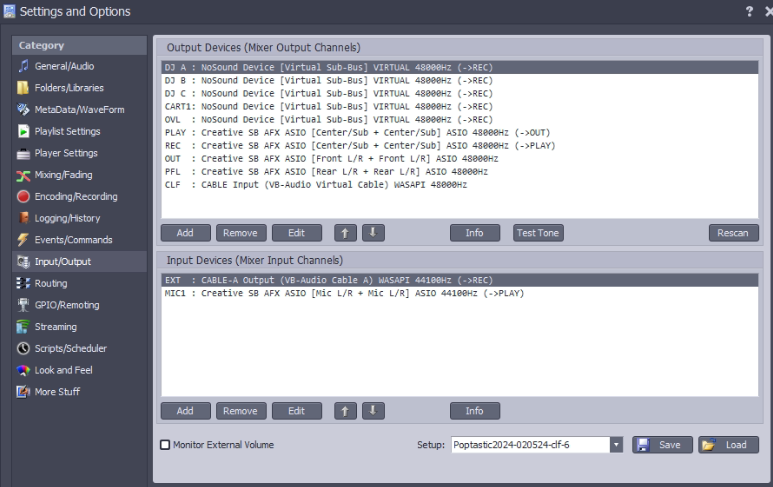
I hope this will help with understanding these two issues.
Thank you for your help.
Here are the screenshots of:
REC channel mixer (identical (except for copy to, of course) to the PLAY channel which works perfectly for recording)
Recording configuration
and Input/Output configuration
I hope this will help with understanding these two issues.
Thank you for your help.